Free
No charge
Fixed location, instant arrival and three favourites.
 Bridivo / LocationNinja
LOCATIONNINJA BY BRIDIVO · ANDROID
Choose a place. Set your movement. Control your simulated Android location.
Google Play release submitted · Public launch pending review
Watch the film How to get startedFixed location is free. Pro is optional. Try a free simulation on your device first.
English narration, captions, and actual app screens.
Real app captures. Light and dark, with controls you can read. Select a screen to enlarge.
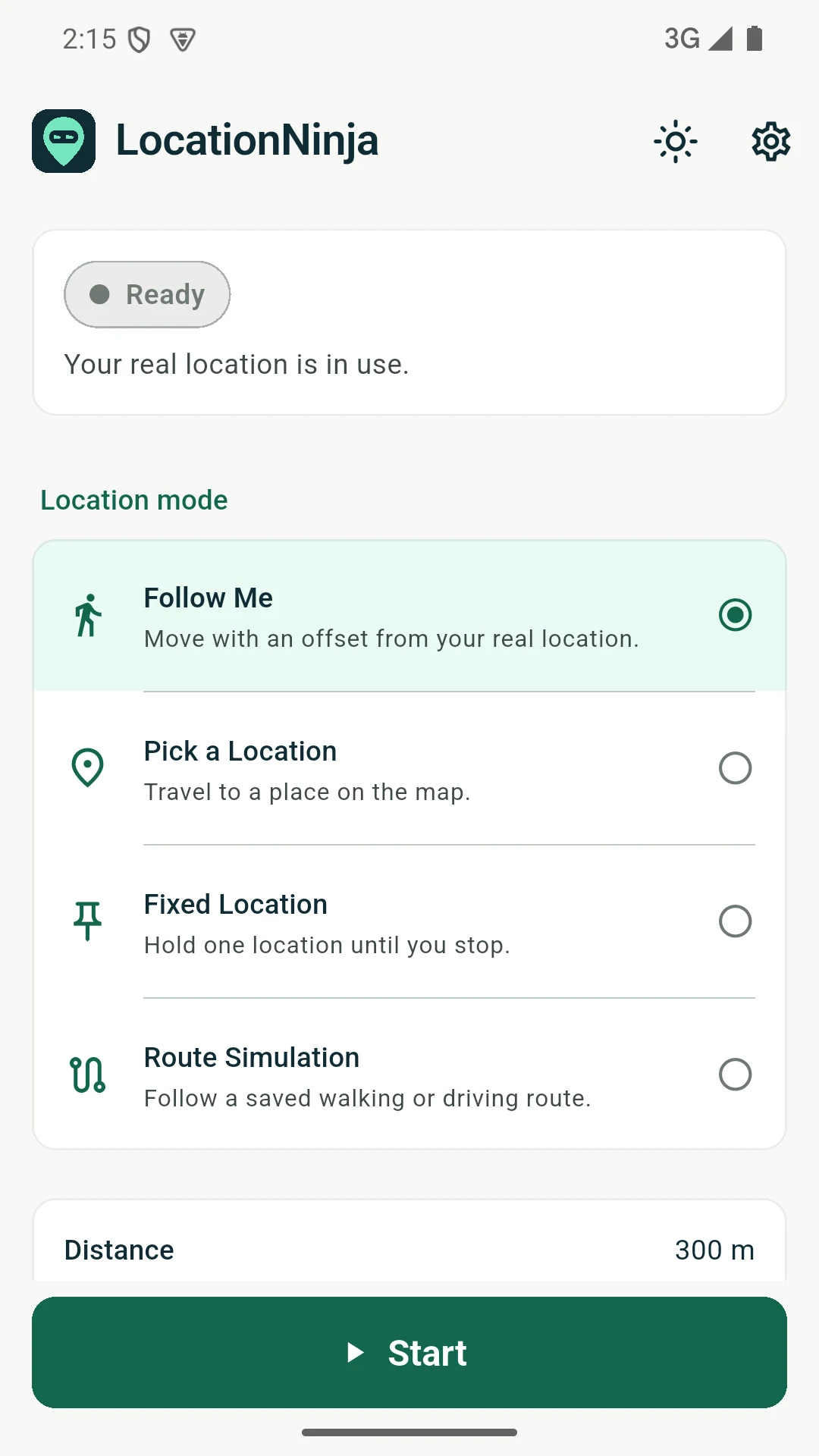
Make your simulated location stay put, follow your movement at an offset, or travel along a route you choose.
LocationNinja by Bridivo works with Android’s mock-location tools. A clear session status shows when simulation is running and explains which apps may still see your real position.
Choose how you move
• Follow Me: follow your real movement at a distance and compass direction you set.
• Pick a Location: find a place on the map and choose instant, walking or driving arrival.
• Fixed Location: hold one location until you stop.
• Route Simulation: create and save multi-point walking or driving routes, with pauses.
Stay in control
Stop instantly from the app or its ongoing notification, or choose a smooth return to your real position when GPS is available. Keep favourite places and routes for next time. Choose English or Arabic, and light, dark or system appearance.
Free and Pro
Free includes fixed location, instant arrival and three favourites. An optional monthly or annual Pro subscription adds Follow Me, walking and driving arrival, route simulation, more favourites and saved routes. No trial. Your local price and subscription terms appear before purchase.
Your data
No app account or ads. Saved places and routes stay on your phone. Map, search and routing providers receive the requests needed for the features you use. Optional anonymous usage counts are off by default.
Before you start
Select LocationNinja as your mock location app in Android Developer options. Android marks simulated locations as mock; apps can detect or reject them. In Standard coverage, apps reading raw GPS can still access your real position. Compatibility varies by device and app.
Maps, search and walking/driving routes use Geoapify by default. Road snapping and automatic stopping-place checks need a separately configured compatible provider and are unavailable by default.
Support: support@bridivo.com
BEFORE YOU SUBSCRIBE
Enable Developer options and choose LocationNinja as your mock location app. Allow location access and notifications when prompted.
Choose a destination, select instant arrival, then Start. The arrival choice stays visible beside Start.
Check the timestamp in a location test app. Stop releases simulation; Return smoothly travels back when real GPS is available.
FREE / PRO
Prices vary by country. Google Play shows the applicable currency, price and subscription terms before purchase. Public availability is pending review.
No charge
Fixed location, instant arrival and three favourites.
Billed monthly
Follow Me, walking and driving arrival, route simulation, 100 favourites and 25 saved routes.
Billed yearly
The same Pro features, with one payment each year. See your local annual price in Google Play.
No trial or lifetime plan. Subscriptions renew automatically at the price shown in Google Play. Cancel before renewal in Google Play → Payments & subscriptions → Subscriptions. Paid access continues until the paid term ends. Uninstalling does not cancel. Restore with the Google account that purchased. Pro needs online purchase verification. Stop, Return and exposure information remain available when Pro ends; existing saved data is kept.
Android requires you to select a mock location app. LocationNinja uses Android’s public test-provider APIs; it does not root your phone or bypass Play Protect.
Apps can detect or reject mock locations or use other signals. Standard coverage leaves raw GPS real for Follow Me. Full coverage can remove the real signal Follow Me needs. There is no universal masking or guaranteed compatibility.
Saved places and routes stay on your device. Map, search and routing providers receive requests needed for their features, which can include locations. Purchase tokens go to our verifier and Google. Optional anonymous usage counts are off by default. See the privacy policy for details.
Email support@bridivo.com with the app version, device model, Android version and a short description. Leave out your coordinates and purchase token.

Digital platforms and practical software, built and operated in Riyadh, Saudi Arabia.
Alsaheel ↗ · Privacy policy · support@bridivo.com